Creating at CREATE! Downtown San Francisco

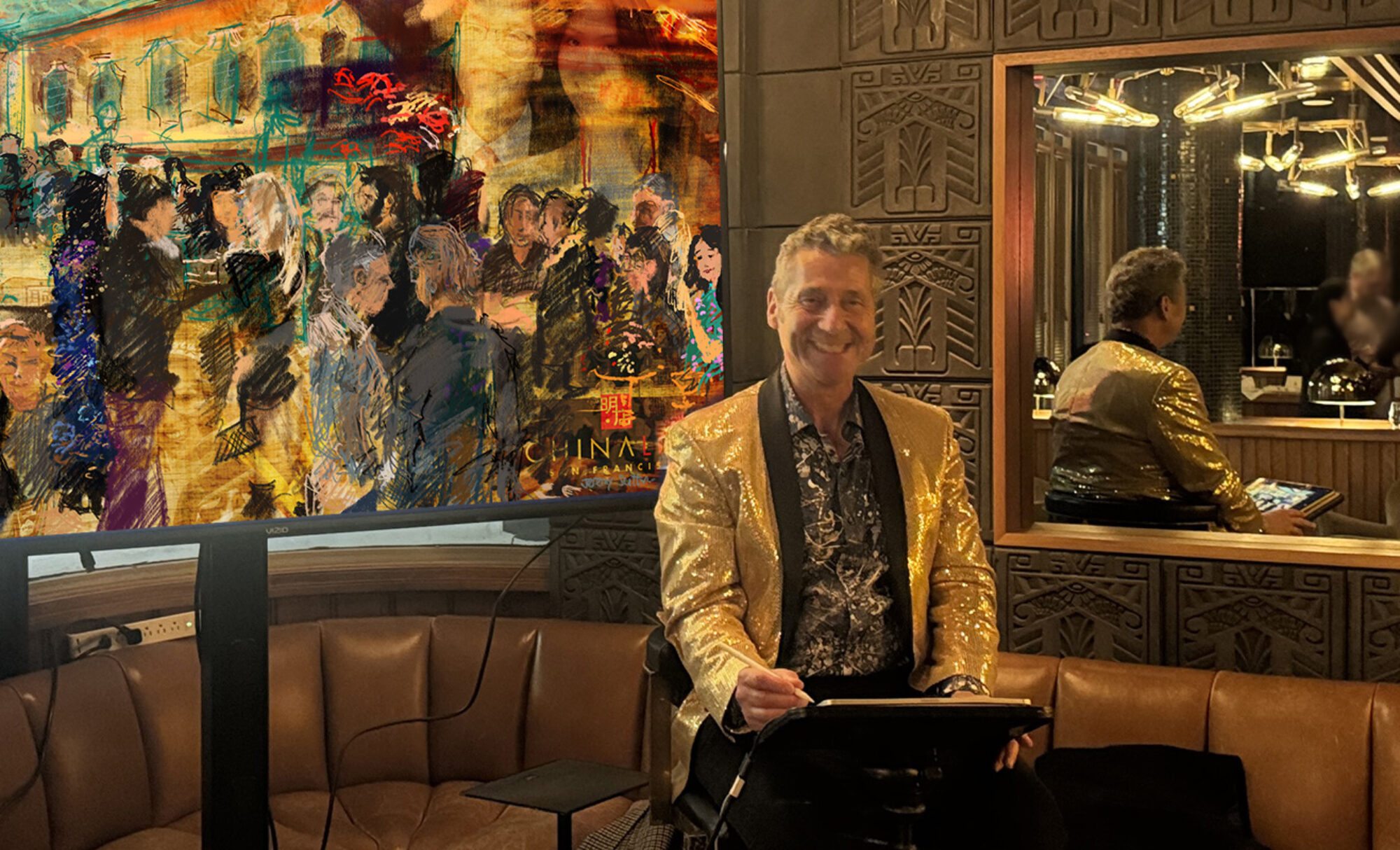
This digital painting was painted live at CREATE!, free public event in Downtown San Francisco https://downtownsf.org/things-to-do/create CREATE! was a wonderful “only in San Francisco” celebration of creativity and the performing, literary and visual arts that took place at the historic Landing at Leidesdorff, next to the Transamerica Pyramid, where the financial district of downtown San Francisco intersects with the North Beach, Chinatown and the old Barbary Coast neighborhoods. The celebration was produced by The Downtown SF Partnership, a nonprofit funded by property and business owners in the downtown district which covers the Financial District and Jackson Square.

I was located at the intersection of Leidesdorff and Commercial Streets, a picturesque pedestrian area free of cars, and created the colorful digital painting of the vibrant scene that you see featured here on this page. My view included a wonderful mural, titled “Beyond the Sea – the life and legacy of Captain Leidesdorff,” created by the Twin Walls Mural Company. https://www.sf.gov/news/mayor-breed-celebrates-launch-new-landing-leidesdorff-downtown-destination Visitors were able to watch my brush strokes unfold in real time on a large display and see my creative process as I painted what I saw (using an iPad Pro, Apple Pencil and the Procreate app).

CREATE! honored the historical artistic significance of the Montgomery Block, affectionately known as ‘Monkey Block,’ an artist enclave that once flourished on the site now occupied by the Transamerica Pyramid. Over its nearly century-long existence, this building was a hub for housing and hosting notable artists, both literary and visual, including Frida Kahlo, Jack London, Robert Louis Stevenson, Dorothea Lange, Diego Rivera, Ambrose Bierce, Bret Harte, and Mark Twain. https://www.sfchronicle.com/chronicle_vault/article/Iconic-SF-building-was-home-to-Bohemians-for-13340080.php https://en.wikipedia.org/wiki/Montgomery_Block

The Landing at Leidesdorff, where I was located, is named after Captain William Alexander Leidesdorff, Jr., the country’s first African-American diplomat amongst many firsts, and one San Francisco’s most notable founders.

William Alexander Leidesdorff (1810-1848)
https://en.wikipedia.org/wiki/William_Leidesdorff It is called “Landing” since in the 19th century it was where ships landed and was the original coastline walked by SF’s earliest inhabitants. https://downtownsf.org/things-to-do/landing-at-leidesdorff/history

Thank you to The Downtown SF Partnership team!

Here are photos from the event:

Photo: Kevin Adams for The Downtown SF Partnership

Photo: Kevin Adams for The Downtown SF Partnership

Photo: Kevin Adams for The Downtown SF Partnership

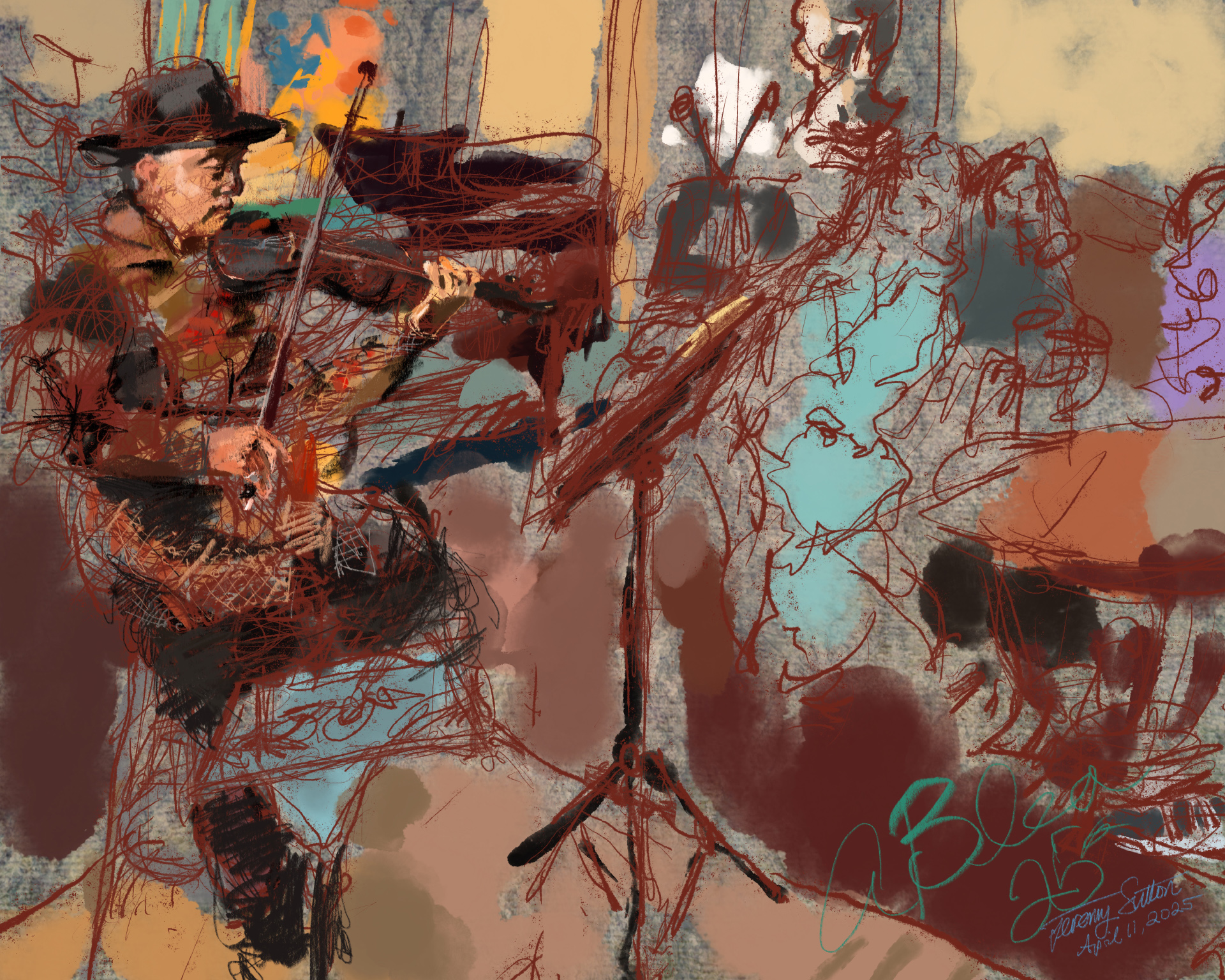
Live Painting Anthony Playing Violin

This painting was drawn directly from life as master violinist Anthony Blea played violin at the opening reception of my Spring Open Studios. I used an iPad pro with Apple pencil and the Procreate app.

Thank you Anthony for the creative collaboration and artistic inspiration! Thank you Stacy and Michael for sharing videos and photos.

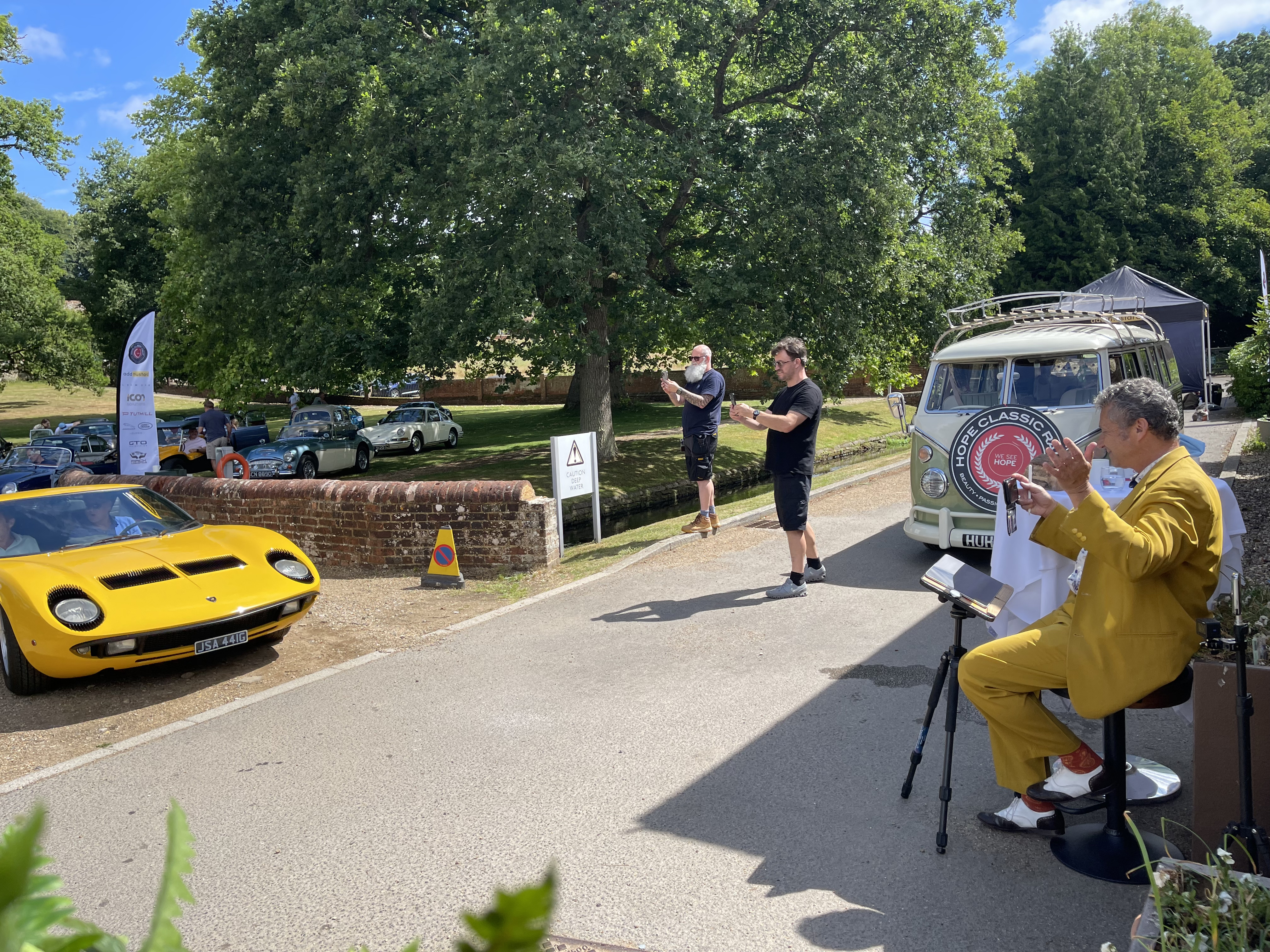
Live Digital Painting at Classic Car Rally

This digital painting was created live at an annual charity fundraiser. I used an iPad Pro, Apple Pencil and the Procreate app. As I painted the artwork, based on direct observation, the guests were able to watch me paint and ask questions, and follow the progress of the artwork on multiple screens. A unique large framed canvas print of the final artwork was then auctioned to raise money for the charity.

“I just want to say a huge thank you. You’ve been a pleasure to work with throughout the entire process and we were thrilled with the final outcome, not just the artwork itself, but also the interactive sparkle you brought to the experience of the day.” ~ L.R.

Here are some photos (courtesy of Louis Roberts) from the event:


Click on the icons above, or on this link, to be taken to the Apple App Store (iOS) to download the free AR app HidNFlix on your iPhone or iPad. Use this link to find HidNFlix in the Google Play Store for installation on Android devices. By pointing your smartphone at any print (or display) of the artwork using the scan mode of the HidNFlix AR app, you will be able to view (and hear) the video story of this art visually “embedded” in the image. The image acts as a visual QR code and the HidNFlix app brings the art image to life! Currently HidNFlix works only on the iOS platform (iPhone, iPad, etc).

Live Painting a Narrative Virtual Mural at Trade Show

This digital painting was painted live on a trade show booth at a medical conference using an iPad Pro. It was projected on a large 16′ x 20′ LED screen that could be seen from afar. The dynamic interactive “narrative virtual mural” artwork activation engaged visitors to the booth. The artwork was built up over three days during the trade show hours. The hand-written quotes you see throughout the artwork are all based on actual input provided live by attendees visiting the booth. They were invited to type into specially provided tablets the reason why they are in their chosen medical field and related special moments. I then added these quotes directly to the artwork as I simultaneously developed a collage of lifestyle vignettes. You can see in the video shown above the progress time-lapse replay compressing three days of work into less than one minute!

In addition to the live activation on the booth I also created for the same client a custom design that was used as a backdrop for a large display in another area of the conference (below).

Live Painting a Visual Narrative at a Trade Show

This “visual narrative virtual mural” artwork was created live on a booth at the a trade show exhibition of a medical conference. Visitors to the booth were asked to take a selfie on a photo booth and write down a reflection on working in the field. I then painted their portrait into the mural and added their quote, using an iPad Pro and Procreate software. The artwork image was projected behind me for all to enjoy watching as it evolved over the three days of the trade show. In the replay video shown above you can see three days of work compressed into 30 seconds!

Painting the Scene: Soirée at an Art Museum

This digital painting was painted live at a company gathering at an art museum. The artwork depicts the scene both outside in the courtyard where I was located, and inside in the magnificent atrium where the band played. I started with a custom background that I created using textures from the floors, doors, walls and paintings in the museum. The artwork was displayed in real time as it was created on a large 82″ flat panel LED display positioned behind me as I painted.

Capturing the Flow of a Meeting

This painting was created live on stage during a meeting. I painted with an iPad Pro, Apple Pencil and the Procreate app to capture the flow of the meeting, featuring visual vignettes of the different featured speakers. At the closing reception the time lapse replay of my entire painting process was shown on monitors for all the guests to enjoy watching.

Digital Portrait Sketches at an Annual Gala

In this activation I sketched quick digital portraits of guests at an annual Gala, each portrait taking about five minutes total per subject, including printing out a 4 inch wide by 6 inch tall dye sublimation print that was then mounted onto a Strathmore card (with matching deckled edge envelope) and given to each subject as a take-away. Guests were delighted with the results and loved their unique artistic keep-sake!

iPad Art 2014


“Ishmeet”, 2014 – This portrait was created from life on a plane journey from London to San Francisco using an iPad Air using the Sketch Club app and Pencil by 53. Click on the video to see stroke by stroke build up of the painting.


“Brandon, Masha and Arthur”, 2014 – This portrait of artist Brandon Jones and his family was created from life on a plane journey from London to San Francisco using Brandon’s Wacom Cintiq Companion Hybrid with the ArtFlow app. It was a “draw off”: he painted me at the same time using my iPad with Sketch Club. Neither of us had used the other’s platform or app before so it was very fun!


“Folly Bridge, Oxford” – painted from life on an iPad Air using the Sketch Club app and Adonit Jot Touch stylus, 2014
”Folly Bridge

“Portrait of Paul”, 2013, created using Art Rage and Adonit Jot Touch stylus on iPad2 at the ideacity conference, Toronto

On this page I share a small sampling of my (mostly) iPad drawings and paintings I have made over the last couple of years. I performed live iPad painting at the De Young Museum in October 2013 for the opening of “David Hockney: A Bigger Exhibition” (see my Inspired by Hockney page). I teach iPad painting workshops and classes. If you’re interested in learning how to draw and paint on your iPad, then please visit Paint on the Go! and The iPad Art Summer School. If you’d like to set up a portrait sitting please email me (jeremy@jeremysutton.com) or call me at (415) 641-1221.


“Still Life Study”, 2013, created using Art Rage and Adonit Jot Touch stylus on iPad2

“Mac at Cana”, 2014, created using Zen Brush and Adonit Jot Touch 4 stylus on iPad Air
”iPad Portrait by Jeremy Sutton c 2014
“Alison Wright”, 2014, created using Sketch Club and Adonit Jot Touch 4 stylus on iPad Air

The portrait of Alison, shown above, is one of a series of portraits I drew from life on my iPad of fellow presenters at FOTOfusion 2014 in West Palm Beach, Florida. Alison is an amazing photo journalistic photographer who has captured portraits of people all over the world, including an extensive series of portraits of Tibetan Buddhists in Tibet and in exile (see her book Face to Face: Portraits of the Human Spirit). The following three portraits (below) were also created at FOTOfusion of fellow presenters.

”iPad Portrait by Jeremy Sutton c 2014
“Lou Jones”, 2014, created using Sketch Club and Adonit Jot Touch 4 stylus on iPad Air

As I drew Lou’s portrait we discussed his six year project in which he and his team photographed and interviewed death row inmates across the country (see his book Final Exposure: Portraits from Death Row). It was an intense subject and that intensity was reflected in the portrait…

”iPad Portrait by Jeremy Sutton c 2014
“Lawrence Gartel”, 2014, created using Art Rage and Sketch Club and Adonit Jot Touch 4 stylus on iPad Air

I’ve known Lawrence, a pioneering digital media artist, for many years. This year at FOTOfusion he drove up in one of his Art Cars. I included a photo I took of his artwork on the car in the background of this portrait.

”iPad Portrait by Jeremy Sutton c 2014
“J. Tomas Lopez”, 2014, created using Sketch Club and Adonit Jot Touch 4 stylus on iPad Air

Tom, University of Miami Department of Art and Art History professor, sat for me for a few minutes at the FOTOfusion Awards Dinner between courses..


”iPad Portrait by Jeremy Sutton c 2014
iPad painting performance at the de Young Museum, San Francisco, at the opening of the David Hockney: Bigger Exhibition. Photo by Stephen Somerstein.

”Portrait
Portrait of Sarah created live during my iPad painting performance at the de Young Museum, San Francisco, at the opening of the David Hockney: Bigger Exhibition. I used Brushes app (favored by Hockney) and an Adonit Jot Touch stylus.

”Portrait
Portrait of Meg created live during my iPad painting performance at the de Young Museum, San Francisco, at the opening of the David Hockney: Bigger Exhibition. I used Brushes app and an Adonit Jot Touch stylus.

”Portrait
Portrait of Lisa and Frank (with self-portrait) created live during my iPad painting performance at the de Young Museum, San Francisco, at the opening of the David Hockney: Bigger Exhibition using Art Rage App app and both the Wacom Intuos Creative Stylus and the Adonit Jot Touch stylus.

”Portrait
iPad sketch of author and historian Lawrence Weschler giving a talk, “Love Life: David Hockney’s Timescapes”, at the de Young, being watched by filmmaker Bruno Wollheim, who created the documentary portrait “David Hockney: A Bigger Picture”, created with the Brushes app and an Adonit Jot Touch stylus.

Over the last two years I have taught iPad painting and given iPad painting presentations in North America and Europe, including at the Oxford Internet Institute, Oxford University, (see William Dutton’s blog post) and at the magnificent flagship Apple Stores in central London (Regent Street), and San Francisco.


“Portrait of Tony”, 2013, created using Sketch Club with Adonit Jot Touch on iPad (created on Southwest flight at 30,000′ altitude). I like the recording feature in Sketch Club that also allows you to easily add your choice of music to the replay.


“Life Study”, 2013, created using Sketch Club with Sensu Brush on iPad2.

“Seated Man, after Diebenkorn”, 2013, created using Art Rage and Adonit Jot Touch stylus on iPad2 at the de Young Museum


Caricaturist Jon Casey and I sketch each other at the Coffee Bar outside my studio in San Francisco, Jon using pencil on paper and me using the procreate app on an iPad with a Sensu brush (see What’s in my studio). For a summary of the different iPad painting apps I am exploring, click here.

“Sketch portrait of Jon Casey”, 2013, creating using procreate on iPad2

In March, 2010, I came across artist Roderick Smith sketching on his iPhone in the Norton Simon Museum, Pasadena, using a PogoStick stylus and Brushes iPhone app, the same one David Hockney started with when he began sketching on his iPhone. He kindly let me have a go. When I got home I ordered a PogoStick and experimented with sketching in Brushes and Sketchbook Pro on the iPhone. It didn’t quite click for me. The iPhone screen felt too small and restricted, and the brush stroke styles too flat and uniform. I preferred sketching in my regular sketchpad.

The iPad introduced a significantly larger painting area. That summer in 2010 I sketched my first iPad portrait from life of one of my students at my Amsterdam Painter Workshop on his iPad (see iPad Sketching in Amsterdam). A year a half later, in January 2012, I went to see David Hockney’s Bigger Picture exhibition at the Royal Academy and was impressed with his display of huge prints of his iPad drawings, as he referred to them, in the spacious galleries of the historic and esteemed institution. For me that was the ahaa moment when i knew iPad art had arrived! On returning to San Francisco, I immediately bought a Nomad brush at Macworld and purchased all the cool iPad painting apps I saw they had on their demo stations, even before I’d purchased an iPad! I then got painting on the iPad in earnest, leading to my teaching iPad art workshops and performing live iPad painting at special events, including the Hockney show.


”Portrait
Lyana sitting for her portrait at an event organized by the Monaco Government Tourist Office. Notice that her name is in the structure of the brush strokes used to portray her. The next two portraits (below) were created at the same event. All portrait subjects received both a JPEG image of their portrait plus a video replay of the painting process of their portraits so they could watch it unfold brush stroke by brush stroke!

”Portrait
“Kyle” – painted from life on an iPad Air using the Sketch Club app and Adonit Jot Touch stylus, 2014


”Portrait
“Shambhavi” – painted from life on an iPad Air using the Sketch Club app and Adonit Jot Touch stylus, 2014


”Portrait
“In Thought” – painted from life on an iPad Air using the Sketch Club app and Adonit Jot Touch stylus, 2014


”Portrait
“Simon Playing Double Bass” – painted from life on an iPad Air using the Sketch Club app and Adonit Jot Touch stylus, 2014


”Portrait
“Tuyen Playing Piano” – painted from life on an iPad Air using the Sketch Club app and Adonit Jot Touch stylus, 2014


”Portrait
“Key West Patio” – painted from life on an iPad Air using the Sketch Club app and Adonit Jot Touch stylus, 2014

Rosa, created in Inspire Pro on the iPad, 2013

Air Painting! A Revolutionary New Way to Paint


Self-portrait, air paint, first portrait ever created from life with air painting, 11/29/2012

Painting in the Air…Literally

Imagine painting in the air, literally… That is now a reality. Since 2012 I have been experimenting with, and helped shape, cutting-edge prototype air painting technologies, working closely with different hardware and software developers. One of the technologies I have explored is the amazingly powerful combination of the revolutionary new Leap Motion Controller, the world’s most accurate 3-D motion-control technology that accurately maps the movement of your hands and fingers in three dimensional space, and Corel Painter Freestyle, a simplified Leap Motion-enabled version of the phenomenal paint program Corel Painter that I have been using for over twenty years.

See the Epson video of me air painting at the SIGGRAPH conference, Anaheim, CA; the Vimeo video featured on the Leap Motion blog; my air painting presentation at the ideaCity conference, Toronto; plus the BBC article.

More recently I have been exploring air painting with other software such as Leap Motion-enabled Ethereal on the Mac platform; with a custom prototype using Kinect technology; and with the Leap Motion combined with the Oculus Rift for VR 3D air painting.


Paradigm Shift

In January 2007 I was a speaker at Macworld and had the pleasure of sitting in the hall when Steve Jobs introduced the iPhone. I see the introduction of the Leap Motion control of computers as an equally significant paradigm-shift in the way we interact with our devices. Just as kids now take touch screens for granted, in a few years they will also take motion gesture control for granted. Painting in the air has a quality of magic… a cross between being a magician, a dancer and a symphony conductor! I am reminded of Arthur C. Clarke’s Third Law: “Any sufficiently advanced technology is indistinguishable from magic.” This certainly fits the bill!


Portrait of Lisa, air painted from life and then printed out on canvas, San Francisco, 3/24/2013. Music: “Valse Sans Nom” by Trio Garufa.

What struck me as I painted the portrait of Lisa and also the still life, both shown above and both created 100% using only movement and gesture of my hands in the air, was (1) the level of fine control of the quality of line I was able to achieve using movement in the z axis, equalling or even surpassing the level of pressure control I have using a pressure-sensitive Wacom pen tablet, and (2) how much I liked the quality of marks I made through motion in the air, and how there was a playfulness and looseness to the line quality that was different to the type of marks I would make either using a Wacom pen-tablet or traditional physical media.

On Wednesday, July 24, I gave a presentation on air painting at the world’s largest conference devoted to computer graphics, SIGGRAPH. I also presented air painting in the SIGGRAPH Studio

The Background to Air Painting with
Leap Motion and Corel Painter

I became aware of Leap Motion in May 2012 and immediately saw the potential for a new way to paint. That same day I contacted both the Corel Painter team and Leap Motion, introduced them to each other and subsequently worked closely with both companies to help shape the resulting Painter product powered by motion gesture input from the Leap Motion device. I am a named inventor on Corel’s pending patent application for controlling color selection using gestures in a vision system. In March I demonstrated painting in the air with Corel Painter Freestyle and Leap Motion in the Leap Motion Experience tent at the South by Southwest (SXSW) Interactive Media Conference, Austin, Texas, where Leap Motion officially launched their product.


Demonstrating air painting in the Leap Motion Experience, plus air painting in the air, literally, at 30,000′ on a Southwest airline plane coming back from SXSW (the first ever air painting at that altitude).


While demonstrating at SXSW I was asked if painting in the air is tiring on my arms. I painted for three full days, each day for about five or six hours, and had no problems with arm fatigue. It was my legs that got tired standing for that long! I positioned the Leap Motion controller device low enough that my arms and hands remained most of the time in what I refer to as “dance position”, that is a comfortable position with a slight bend in the elbows. Here are a few links related to the SXSW air painting demonstration:

Press Release from Corel published in ImagineFX magazine

Forbes video from SXSW

Vine video taken at SXSW by Steve Garfield

Instagram photo taken at SXSW by Steve Garfield

Article in the Verge

More About Corel Painter Freestyle

Corel Painter Freestyle allows you to easily select brushes, textures, commands and choose hue, value and saturation, to know where your cursor is in hover mode and to finely control your entry through the painting plane, all through hand movement and gesture. I can even save my files, clear the canvas and finely control the brush stroke quality, size, opacity and movement, and then be able to easily choose from 24 million colours, all with movement in the air and without touching anything. It takes a little practice to get used to, but once you do get the hang of it and sense of where the 3D painting zone is in space, it is absolutely brilliant as well as fun.

The Very First Air Paintings

The self-portrait you see at the top of this page was created on November 29th, 2012, and is, to my knowledge, the first painting from life ever created with 100% air painting. I was using early prototypes of both the Leap Motion controller and a Leap-enabled version of Corel Painter. A few days after this self-portrait I created the first ever air painting portrait of another subject from life:


Portrait of Chris, air paint, 12/1/2012